

Introduction
What is DataPulse
DataPulse improves data management in the sports betting industry by offering software that allows operators to efficiently combine and control multiple data feeds in one streamlined output, serving more than just an aggregator. Placed between a sportsbook platform and various data feeds, DataPulse handles all content data-related tasks. While some large platforms provide similar tools, building and maintaining a feed management system can be too expensive for small to medium-sized companies. DataPulse fills this need with products that help operators increase margins, boost engagement, and reduce costs.
Our product
The product is a multiple data feed manager which utilizes multiple feeds to build one high quality, best in class feed. Feed Manager is a sophisticated tool designed to streamline the integration and management of sports event data feeds into any sportsbook platform. It enables the efficient handling of data from multiple third-party service providers, ensuring accurate and timely updates to sporting event information, odds, and results within the Sportsbook ecosystem.
Each client will have one consumer where they can build their own feed templates. The consumer will use any or all the odds available for pre-match, including the ability to build templates and groups of leagues. For in-play the operator will have the option to select a straight-through feed from a high-quality feed provider, or a default feed offered by DataPulse.
Communication Channels for Support
Our team is committed to providing you with the assistance you need. We offer multiple communication channels to ensure that your queries and issues are addressed promptly. You can reach our support team through the following channels:
For further assistance, please contact us via:
Email: sales@data-pulse.co / support@data-pulse.co
Phone: +357 96235848
Telegram: Link to Telegram
WhatsApp: Link to WhatsApp
Viber: Link to Viber
Our support team is available 24/7, ensuring you receive timely assistance regardless of your time zone. Please don’t hesitate to contact us through any of these channels.
Overview
1. Integration Process: A step-by-step guide to integrating your system with DataPulse, ensuring seamless connectivity and data flow.
2. Backend Integration: How-To Guides: Detailed instructions on how to set up and configure backend systems for optimal integration with DataPulse.
3. Versioning and updates: Information on how DataPulse manages API versions, including update schedules and deprecation policies.
4. The On-Demand API: How-To Guides: Comprehensive guides on utilizing the On-Demand API to access real-time sports feed data.
5. Booking API: How to Book Sports Events (Fixtures) Phase Two How-To Guides: Instructions for booking sports events using the Booking API, including advanced features in Phase Two.
6. Sports Feed Messages: Examples and explanations of the various message types and formats used in the DataPulse sports feed.
7. Future plans for DataPulse sports feed aggregator: An outline of upcoming features and improvements planned for the DataPulse sports feed aggregator.
8. The usage of SDK: DataPulse provides tailored SDKs and dedicated support to ensure a smooth and efficient integration, whether you're working with our APIs or data feeds.
9. Glossary of Terms: Definitions and explanations of key terms and concepts used throughout the DataPulse documentation.
Integration process
Overview
DataPulse’s integration process ensures a smooth and efficient setup for our clients. We start with a non-technical business call to introduce our product and understand your needs. Next, we conduct a technical call to gather necessary information and set up your account. We then provide UAT feed information, including connection details and documentation. After evaluating production readiness, we set up your production account and deliver the final production environment.
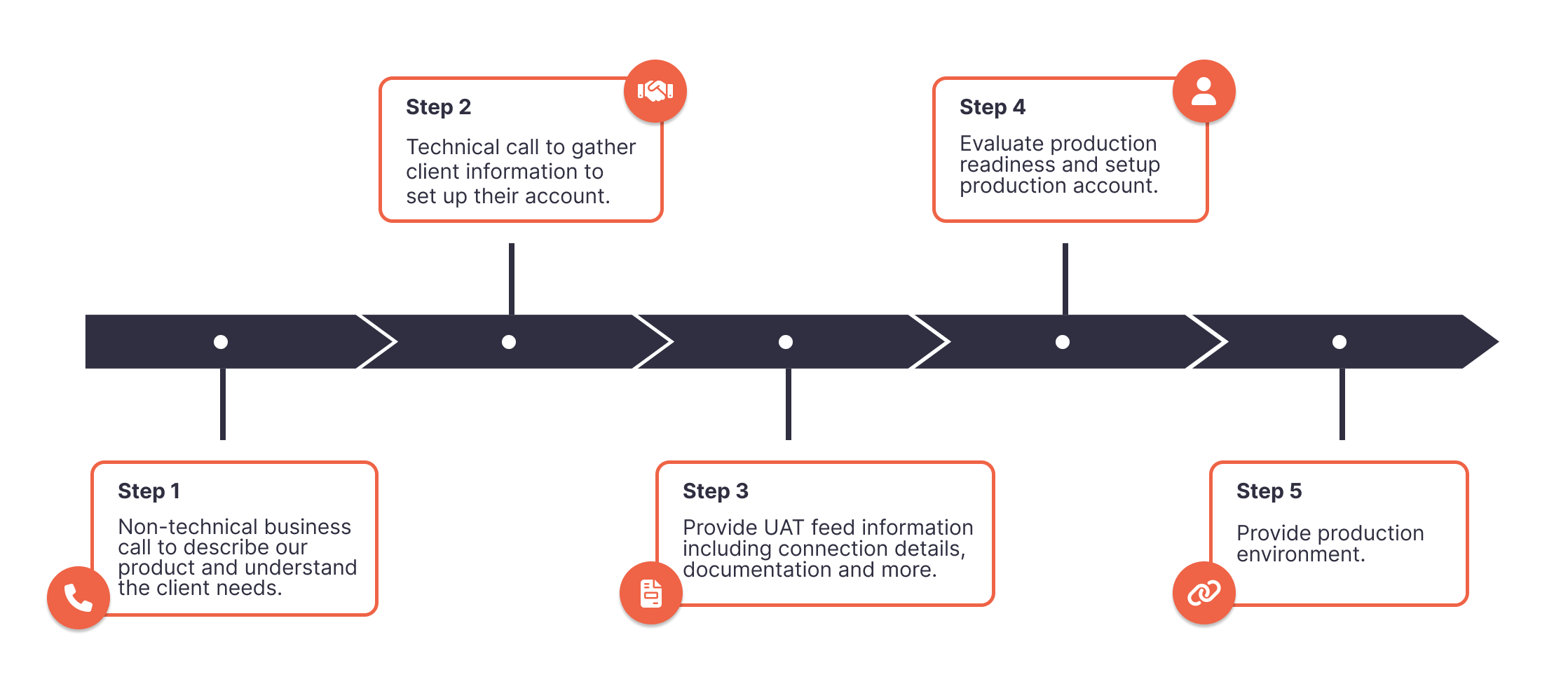
DataPulse offers two primary options for integrating your services: RabbitMQ and RESTful Webhooks. After selecting your preferred integration method, the process continues with shared steps that apply to both options, ensuring a smooth transition from testing to production.
Step 1: Choose Your Integration Method
SHELL Post example
curl -X POST 'https://keycloak.example.com/auth/realms/myrealm/protocol/openid-connect/token' \ -H 'Content-Type: application/x-www-form-urlencoded' \ -d 'client_id=myclient' \ -d 'username=johndoe' \ -d 'password=secretpassword' \ -d 'grant_type=password' \ -d 'client_secret=supersecret'
Option 1: Integration via RabbitMQ
C# Authentication example
using System;
using System.Net.Http;
using System.Threading.Tasks;

class Program
{
    static async Task Main(string[] args)
    {
        var client = new HttpClient();
        var request = new HttpRequestMessage(HttpMethod.Post, "https://keycloak.example.com/auth/realms/myrealm/protocol/openid-connect/token");
        request.Content = new FormUrlEncodedContent(new[]
        {
            new KeyValuePair<string, string>("client_id", "myclient"),
            new KeyValuePair<string, string>("username", "johndoe"),
            new KeyValuePair<string, string>("password", "secretpassword"),
            new KeyValuePair<string, string>("grant_type", "password"),
            new KeyValuePair<string, string>("client_secret", "supersecret")
        });

        var response = await client.SendAsync(request);
        var content = await response.Content.ReadAsStringAsync();

        Console.WriteLine(content);
    }
}
Integrating via RabbitMQ provides fast and reliable data delivery through dedicated queues.
Unique Steps for RabbitMQ Integration:
C# Consuming messages from RabbitMQ example
using RabbitMQ.Client;
using RabbitMQ.Client.Events;
using System;
using System.Text;

class Program
{
    static void Main(string[] args)
    {
        var factory = new ConnectionFactory()
        {
            HostName = "localhost",
            UserName = "guest",
            Password = "guest"
        };

        using var connection = factory.CreateConnection();
        using var channel = connection.CreateModel();

        // Declare a quorum queue
        channel.QueueDeclare(queue: "my_quorum_queue",
                             durable: true,
                             exclusive: false,
                             autoDelete: false,
                             arguments: new Dictionary<string, object>
                             {
                                 { "x-queue-type", "quorum" }
                             });

        var consumer = new EventingBasicConsumer(channel);
        consumer.Received += (model, ea) =>
        {
            var body = ea.Body.ToArray();
            var message = Encoding.UTF8.GetString(body);
            Console.WriteLine("Received message: {0}", message);

            try
            {
                // Process the message here

                // Send ACK to RabbitMQ to confirm message processing
                channel.BasicAck(deliveryTag: ea.DeliveryTag, multiple: false);
            }
            catch (Exception ex)
            {
                Console.WriteLine("Error processing message: {0}", ex.Message);

                // Send NACK to RabbitMQ to indicate message failure
                // and requeue the message for another attempt
                channel.BasicNack(deliveryTag: ea.DeliveryTag, multiple: false, requeue: true);
            }
        };

        channel.BasicConsume(queue: "my_quorum_queue", autoAck: false, consumer: consumer);

        Console.WriteLine("Listening for messages. Press [enter] to exit.");
        Console.ReadLine();
    }
}
Pre-Integration Setup:
- Authentication Mechanism: DataPulse will establish a secure authentication mechanism tailored to your requirements. We will provide you with the necessary credentials, access permissions, and configuration details, such as the queue name, connection string and user accounts.
Service Deployment:
- Queue Connection: Deploy a service that connects to the RabbitMQ queue using the provided credentials and configuration details.
- Message Processing: Implement logic to listen for incoming messages, process each message, and send an ACK response to ensure message delivery confirmation.
- Error Handling: Incorporate robust error-handling mechanisms to efficiently manage message rejections and retries.
Integration Testing:
- Performance Tuning: Optimize the service for optimal performance, considering message volume and processing speed.
Option 2: Integration via RESTful Webhook
RESTful Webhooks enable you to receive updates through HTTP POST requests, offering flexibility and simplicity in integration.
Unique Steps for RESTful Webhook Integration:
Deploy a Webhook Endpoint:
- Service Setup: Deploy a RESTful service in your test or development environment capable of receiving HTTP POST requests.
- Endpoint Details: Provide DataPulse with the following details: URL: The endpoint URL for update messages. Documentation: Relevant documentation, WSDL, or similar resources. Authentication: Username and password if required for access control.
Integration Service Testing:
- Access Verification: DataPulse will test the webhook endpoint to ensure accessibility and proper response handling.
- Message Types: Ensure your service can handle both ProcessMessage and Heartbeat message types.
Step 2: Shared Steps After Integration Method Selection
Regardless of the chosen integration method, the following steps will guide you through system configuration, testing, deployment, and going live.
System Configuration and Testing
- Environment Configuration:
- DataPulse will configure the User Acceptance Testing (UAT) environment to ensure seamless delivery of messages and heartbeats.
- Testing and Verification:
- We will verify that heartbeats and update messages can be delivered to your endpoint.
- This phase typically lasts one to two working days to ensure all systems function as expected.
- Credential Provisioning:
- DataPulse will create user accounts for relevant products and forward the credentials to your team for integration testing.
Customer Development and Testing
- Full Access:
- You will receive full access to the contracted services, allowing you to complete your development and testing processes.
- Technical Support:
- DataPulse will provide ongoing technical assistance and advice throughout this period to address any issues or questions.
Deployment to Production
- Production Environment Setup:
- Deploy your receiver service to the production environment, ensuring all configurations are correctly applied.
- Receiver Details: Provide DataPulse with production receiver service details, including endpoint URL and access credentials.
- Account Setup:
- DataPulse will create the necessary user accounts for your organization, requiring all users' names and email addresses who need system access.
Go-Live and Monitoring
- Final Checks:
- After confirming that all configurations and connections are correctly set up, the service will be deployed to production.
- Launch Support:
- Our team will assist you in launching the service to your customers, ensuring a smooth transition and monitoring performance.
- Monitoring and Support:
- Implement monitoring tools to track message flow and performance. DataPulse support is available 24/7 to assist with any issues.
Backend Integration: How-To Guides
Prerequisites
Before commencing the integration process, please ensure the following prerequisites are fulfilled:
Client IP Whitelisting:
- Configure your network infrastructure to permit both inbound and outbound connections with DataPulse services. Whitelist the designated IP addresses to guarantee seamless connectivity.
Service Account Setup:
- Establish a service account within your organization dedicated to managing the integration. This account should be granted the necessary permissions to access DataPulse services and manage the data flow effectively.
Endpoint Configuration:
- RabbitMQ Endpoint: If integrating via RabbitMQ, DataPulse will provide the required endpoint URL, queue names, and access credentials for message connection and consumption.
- Webhook Endpoint: For RESTful integration, provide DataPulse with the URL of your webhook, which will be used to receive JSON HTTP POST messages.
RabbitMQ Integration
C# RabbitMQ Integration
using System;
using RabbitMQ.Client;
using RabbitMQ.Client.Events;
using System.Text;

class RabbitMQListener
{
    private static readonly string QueueName = "your_queue_name"; // Replace with your actual queue name
    private static readonly string HostName = "your_rabbitmq_host"; // Replace with your RabbitMQ host
    private static readonly string UserName = "your_username"; // Replace with your RabbitMQ username
    private static readonly string Password = "your_password"; // Replace with your RabbitMQ password

    public static void Main()
    {
        var factory = new ConnectionFactory()
        {
            HostName = HostName,
            UserName = UserName,
            Password = Password,
            DispatchConsumersAsync = true
        };

        using var connection = factory.CreateConnection();
        using var channel = connection.CreateModel();

        // Declare a quorum queue
        channel.QueueDeclare(queue: QueueName,
                             durable: true,
                             exclusive: false,
                             autoDelete: false,
                             arguments: new Dictionary<string, object>
                             {
                                 { "x-queue-type", "quorum" }
                             });

        var consumer = new AsyncEventingBasicConsumer(channel);
        consumer.Received += async (model, ea) =>
        {
            var body = ea.Body.ToArray();
            var message = Encoding.UTF8.GetString(body);
            Console.WriteLine("Received message: {0}", message);

            // Process the message here

            // Acknowledge the message
            channel.BasicAck(deliveryTag: ea.DeliveryTag, multiple: false);
        };

        // Start consuming messages
        channel.BasicConsume(queue: QueueName,
                             autoAck: false,
                             consumer: consumer);

        Console.WriteLine("Listening for messages. Press [enter] to exit.");
        Console.ReadLine();
    }
}
Connecting to RabbitMQ with Quorum Queues
The following C# code sample demonstrates how to connect to a RabbitMQ queue with quorum queues and listen for incoming messages:
Explanation:
- Quorum Queue Declaration: The QueueDeclare method specifies the queue type as quorum, which ensures message durability and fault tolerance.
- Message Processing: The consumer.Received event handler processes incoming messages and acknowledges them using BasicAck.
- Connection Settings: The connection factory is configured with the necessary RabbitMQ host, username, and password.
RESTful Integration
C# RESTful Integration
using Microsoft.AspNetCore.Mvc;
using Newtonsoft.Json.Linq;

namespace DataPulseIntegration.Controllers
{
    [Route("api/[controller]")]
    [ApiController]
    public class DataPulseController : ControllerBase
    {
        [HttpPost("heartbeat")]
        public IActionResult Heartbeat([FromBody] JObject payload)
        {
            // Process Heartbeat message
            Console.WriteLine("Received Heartbeat: {0}", payload.ToString());

            // Handle the heartbeat logic here

            return Ok("Heartbeat received");
        }

        [HttpPost("process")]
        public IActionResult ProcessMessage([FromBody] JObject payload)
        {
            // Process ProcessMessage
            Console.WriteLine("Received ProcessMessage: {0}", payload.ToString());

            // Handle the process message logic here

            return Ok("ProcessMessage received");
        }
    }
}
Listening for Heartbeat and ProcessMessage
Below is a sample C# ASP.NET Core controller that listens for HTTP POST requests containing Heartbeat and ProcessMessage payloads in JSON format.
Explanation:
- ASP.NET Core Controller: The DataPulseController defines endpoints for handling Heartbeat and ProcessMessage requests.
- HTTP POST Methods: The [HttpPost] attribute specifies that the methods will handle HTTP POST requests at /api/datapulse/heartbeat and /api/datapulse/process.
- JSON Payload Processing: The payload is parsed using JObject from the Newtonsoft.Json library, allowing easy access to JSON data within the request body.
Steps for Deployment:
Configure Your API:
- Ensure your ASP.NET Core application is set up and running in your desired environment (development, test, or production).
Expose the Endpoints:
- Make sure your API endpoints are publicly accessible and properly secured with authentication if necessary.
Notify DataPulse:
- Provide DataPulse with the URLs of your API endpoints so that we can begin sending data to your system.
The On-Demand API: How-To Guides
This section provides detailed instructions for using our On-Demand API to request specific details from the sports feed via HTTP. This API is designed to allow clients to retrieve data on demand, especially if their system missed an update or requires specific information from any feed type.
Booking API: How to Book Sports Events (Fixtures) Phase Two How-To Guides
Sports Feed Messages
Fixture message
JSON Fixture Message
{
  "Header": {
    "Retry": 0,
    "MessageGuid": "00000000-0000-0000-0000-000000000000",
    "TimeStampUtc": "2024-08-01T00:00:00.000000Z"
  },
  "Fixture": {
    "Id": "FI00000",
    "Name": "Team A v Team B",
    "Round": {
      "Id": "RD00000",
      "Name": "Month"
    },
    "Sport": {
      "Id": "ST00000",
      "Name": "Sport Name"
    },
    "Season": {
      "Id": "SN00000",
      "Name": "Season Name"
    },
    "Status": "Scheduled",
    "Competition": {
      "Id": "CN00000",
      "Name": "Competition Name",
      "Region": {
        "Id": 0,
        "Name": "Region Name"
      }
    },
    "Competitors": [
      {
        "Id": "CR00010",
        "Name": "Team A",
        "Gender": "Gender",
        "HomeAway": "Home",
        "Competitors": [
          {
            "Id": "CR00011",
            "Name": "Player A1",
            "Gender": "Gender",
            "HomeAway": "Home",
            "LastName": "LastNameA1",
            "FirstName": "FirstNameA1",
            "SquadNumber": "0",
            "CompetitorType": "Person"
          },
          {
            "Id": "CR00012",
            "Name": "Player A2",
            "Gender": "Gender",
            "HomeAway": "Home",
            "LastName": "LastNameA2",
            "FirstName": "FirstNameA2",
            "SquadNumber": "0",
            "CompetitorType": "Person"
          },
          {
            "Id": "CR00013",
            "Name": "Player A3",
            "Gender": "Gender",
            "HomeAway": "Home",
            "LastName": "LastNameA3",
            "FirstName": "FirstNameA3",
            "SquadNumber": "0",
            "CompetitorType": "Person"
          }
        ],
        "CompetitorType": "Team"
      },
      {
        "Id": "CR00020",
        "Name": "Team B",
        "Gender": "Gender",
        "HomeAway": "Away",
        "Competitors": [
          {
            "Id": "CR00021",
            "Name": "Player B1",
            "Gender": "Gender",
            "HomeAway": "Away",
            "LastName": "LastNameB1",
            "FirstName": "FirstNameB1",
            "SquadNumber": "0",
            "CompetitorType": "Person"
          },
          {
            "Id": "CR00022",
            "Name": "Player B2",
            "Gender": "Gender",
            "HomeAway": "Away",
            "LastName": "LastNameB2",
            "FirstName": "FirstNameB2",
            "SquadNumber": "0",
            "CompetitorType": "Person"
          },
          {
            "Id": "CR00023",
            "Name": "Player B3",
            "Gender": "Gender",
            "HomeAway": "Away",
            "LastName": "LastNameB3",
            "FirstName": "FirstNameB3",
            "SquadNumber": "0",
            "CompetitorType": "Person"
          }
        ],
        "CompetitorType": "Team"
      }
    ],
    "FixtureType": "Match",
    "StartTimeUtc": "2024-08-02T00:00:00Z"
  }
}
This dataset provides information about a scheduled fixture. It includes details such as the fixture's unique identifier, names of the competing teams, the round and season of the competition, and the competition's region. Additionally, it lists the players involved in each team, their roles, and the scheduled start time of the fixture.
Explanation:
Header
- Retry: (number) The number of times a request should be retried in case of failure.
- MessageGuid: (string) A unique identifier for the message, typically used for tracking and reference purposes.
- TimeStampUtc: (string) The timestamp indicating when the message was created, formatted in UTC.
Fixture
- Id: (string) Unique identifier for the fixture.
- Name: (string) The name or description of the fixture, which typically includes the teams or participants involved.
- Round:
- Id: (string) Unique identifier for the round in which the fixture occurs.
- Name: (string) The name or description of the round, such as "Month" in this case.
- Sport:
- Id: (string) Unique identifier for the sport.
- Name: (string) The name of the sport being played.
- Season:
- Id: (string) Unique identifier for the season in which the fixture occurs.
- Name: (string) The name or description of the season.
- Status: (string) The current status of the fixture, e.g., "Scheduled", "Deleted", "Unknown"
- Competition:
- Id: (string) Unique identifier for the competition.
- Name: (string) The name of the competition in which the fixture is part.
- Region:
- Id: (string) Unique identifier for the region where the competition is held.
- Name: (string) The name of the region where the competition is held.
- Competitors: (array) A list of competitors involved in the fixture. Each competitor has the following properties:
- Id: (string) Unique identifier for the competitor.
- Name: (string) The name of the competitor (team or individual).
- Gender: (string) The gender of the competitor, if applicable.
- HomeAway: (string) Indicates whether the competitor is playing at home or away.
- Competitors: (array, optional) If the competitor is a team, this array lists individual players or members of the team. Each player has:
- Id: (string) Unique identifier for the player.
- Name: (string) The name of the player.
- Gender: (string) The gender of the player, if applicable.
- HomeAway: (string) Indicates whether the player is playing at home or away.
- LastName: (string) The last name of the player.
- FirstName: (string) The first name of the player.
- SquadNumber: (string) The squad number assigned to the player.
- CompetitorType: (string) Indicates whether the individual is a "Person" or a "Team."
- CompetitorType: (string) Indicates whether the competitor is a "Person" or a "Team."
- FixtureType: Type of the fixture ("Match", "Outright", "Aggregate", "Virtual").
- StartTimeUtc: (string) The date and time when the fixture is scheduled to start, formatted in UTC.
MarketSet message
JSON MarketSet Message
{
  "Header": {
    "Retry": 0,
    "MessageGuid": "00000000-0000-0000-0000-000000000000",
    "TimeStampUtc": "2024-08-09T00:00:00.000000Z"
  },
  "MarketSet": {
    "Markets": [
      {
        "Id": 000000000,
        "Name": "Market Name 1",
        "InPlay": false,
        "ExpiryUtc": "2024-08-11T00:00:00Z",
        "MarketType": {
          "Id": 00000,
          "Name": "Market Type Name 1",
          "IsHandicap": false
        },
        "Selections": [
          {
            "Id": 000000000,
            "Name": "Selection 1",
            "Range": {
              "Low": 0.0,
              "High": 0.0
            },
            "Decimal": 1.0,
            "Numerator": 1,
            "Denominator": 1,
            "TradingStatus": "Trading"
          },
          {
            "Id": 000000001,
            "Name": "Selection 2",
            "Range": {
              "Low": 1.0,
              "High": 1.0
            },
            "Decimal": 2.0,
            "Numerator": 2,
            "Denominator": 1,
            "TradingStatus": "Trading"
          }
        ],
        "TradingStatus": "Open"
      },
      {
        "Id": 000000001,
        "Name": "Market Name 2",
        "InPlay": false,
        "ExpiryUtc": "2024-08-11T00:00:00Z",
        "MarketType": {
          "Id": 00000,
          "Name": "Market Type Name 2",
          "IsHandicap": false
        },
        "Selections": [
          {
            "Id": 000000002,
            "Name": "Selection 1",
            "Decimal": 1.0,
            "Numerator": 1,
            "Denominator": 1,
            "CompetitorId": "CR00010",
            "TradingStatus": "Suspended"
          },
          {
            "Id": 000000003,
            "Name": "Selection 2",
            "Decimal": 2.0,
            "Numerator": 2,
            "Denominator": 1,
            "CompetitorId": "CR00020",
            "TradingStatus": "Trading"
          }
        ],
        "TradingStatus": "Open"
      },
      {
        "Id": 000000002,
        "Name": "Market Name 3",
        "InPlay": false,
        "ExpiryUtc": "2024-08-11T00:00:00Z",
        "MarketType": {
          "Id": 00000,
          "Name": "Market Type Name 3",
          "IsHandicap": false
        },
        "Selections": [
          {
            "Id": 000000004,
            "Name": "Selection 1",
            "Decimal": 1.0,
            "Numerator": 1,
            "Denominator": 1,
            "CompetitorId": "CR00010",
            "TradingStatus": "Suspended"
          },
          {
            "Id": 000000005,
            "Name": "Selection 2",
            "Decimal": 2.0,
            "Numerator": 2,
            "Denominator": 1,
            "CompetitorId": "CR00020",
            "TradingStatus": "Trading"
          }
        ],
        "TradingStatus": "Open"
      }
    ],
    "FixtureId": "FI0000"
  }
}
This dataset provides information on a set of markets associated with a specific fixture. It includes details such as the market identifiers, names, types, and expiry times. Each market contains a list of selections with their respective identifiers, names, decimal values, and trading statuses. The dataset also specifies whether each market is currently open or in play.
Explanation:
Header
- Retry: (number) The number of times a request should be retried in case of failure.
- MessageGuid: (string) A unique identifier for the message, typically used for tracking and reference purposes.
- TimeStampUtc: (string) The timestamp indicating when the message was created, formatted in UTC.
MarketSet
Markets: (array) A list of markets within the market set. Each market has the following properties:
- Id: (number) Unique identifier for the market.
- Name: (string) The name or description of the market.
- InPlay: (boolean) Indicates whether the market is currently in play.
- ExpiryUtc: (string) The date and time when the market expires, formatted in UTC.
- MarketType:
- Id: (number) Unique identifier for the type of market.
- Name: (string) The name or description of the market type.
- IsHandicap: (boolean) Indicates whether the market type involves a handicap.
- Selections: (array) A list of selections available in the market. Each selection has the following properties:
- Id: (number) Unique identifier for the selection.
- Name: (string) The name or description of the selection.
- Range: (object, optional) The range of values for the selection, containing:
- Low: (number) The lower bound of the range.
- High: (number) The upper bound of the range.
- Decimal: (number) The decimal odds for the selection.
- Numerator: (number) The numerator part of the fractional odds for the selection.
- Denominator: (number) The denominator part of the fractional odds for the selection.
- CompetitorId: (string, optional) Unique identifier for the competitor associated with the selection.
- TradingStatus: Current trading status of the selection ("Trading", "Suspended", "Unpriced", "NonRunner").
- TradingStatus: Current trading status of the market ("Open", "Suspended", "Closed").
FixtureId: (string) Unique identifier for the fixture associated with the market set.
ResultSet message
JSON ResultSet Message
{
  "Header": {
    "Retry": 0,
    "MessageGuid": "00000000-0000-0000-0000-000000000000",
    "TimeStampUtc": "2024-08-09T00:00:00.0000000Z"
  },
  "ResultSet": {
    "Results": [
      {
        "Results": [
          {
            "SelectionId": 000000000,
            "ResultStatus": "Loser"
          },
          {
            "SelectionId": 000000001,
            "ResultStatus": "Winner"
          },
          {
            "SelectionId": 000000002,
            "ResultStatus": "Loser"
          },
          {
            "SelectionId": 000000003,
            "ResultStatus": "Loser"
          },
          {
            "SelectionId": 000000004,
            "ResultStatus": "Loser"
          },
          {
            "SelectionId": 000000005,
            "ResultStatus": "Loser"
          },
          {
            "SelectionId": 000000006,
            "ResultStatus": "Loser"
          }
        ],
        "MarketId": 000000000
      }
    ],
    "FixtureId": "FI0000"
  }
}
This dataset contains results for a specific fixture, detailing the outcomes for various selections within a market. It includes identifiers for each selection, along with their result status (e.g., "Winner" or "Loser"). The data is organized by market and associated with the fixture identifier.
Explanation:
Header
- Retry: (number) The number of times a request should be retried in case of failure.
- MessageGuid: (string) A unique identifier for the message, typically used for tracking and reference purposes.
- TimeStampUtc: (string) The timestamp indicating when the message was created, formatted in UTC.
ResultSet
Results: (array) A list of result sets. Each result set has the following properties:
- Results: (array) A list of results within the result set. Each result has the following properties:
- SelectionId: (number) Unique identifier for the selection whose result is being reported.
- ResultStatus: (string) The result status of the selection, such as "Winner" or "Loser."
- MarketId: (number) Unique identifier for the market to which the result set belongs.
FixtureId: (string) Unique identifier for the fixture associated with the result set.
Coverage message
JSON Coverage Message
{
  "Header": {
    "Retry": 0,
    "MessageGuid": "00000000-0000-0000-0000-000000000000",
    "TimeStampUtc": "2024-08-08T00:00:00.0000000Z"
  },
  "Coverage": {
    "IsBooked": false,
    "FixtureId": "FI0000",
    "AvailableFeeds": [
      {
        "Type": "FeedType1",
        "IsLicensed": true
      },
      {
        "Type": "FeedType2",
        "IsLicensed": true
      }
    ]
  }
}
This dataset provides information about the coverage status of a specific fixture. It includes whether the fixture is booked and details on available data feeds. Each feed is listed with its type and licensing status, indicating whether it is licensed for use.
Explanation:
Header
- Retry: (number) The number of times a request should be retried in case of failure.
- MessageGuid: (string) A unique identifier for the message, typically used for tracking and reference purposes.
- TimeStampUtc: (string) The timestamp indicating when the message was created, formatted in UTC.
Coverage
- IsBooked: (boolean) Indicates whether the coverage for the fixture has been booked.
- FixtureId: (string) Unique identifier for the fixture associated with the coverage.
- AvailableFeeds: (array) A list of available feeds for the fixture. Each feed has the following properties:
- Type: (string) The type or category of the feed.
- IsLicensed: (boolean) Indicates whether the feed is licensed.
Match Details message
JSON Match Details Message
{
  "Header": {
    "Retry": 0,
    "MessageGuid": "00000000-0000-0000-0000-000000000000",
    "TimeStampUtc": "2024-08-09T00:00:00.0000000Z"
  },
  "FootballMatchDetails": {
    "AwayTeam": {
      "Id": "CR00010",
      "Name": "Team A",
      "Strip": {
        "Color1": {
          "B": 0,
          "G": 128,
          "R": 0
        },
        "Color2": {
          "B": 0,
          "G": 128,
          "R": 0
        },
        "PantsColor": null,
        "SocksColor": null,
        "JerseyDesign": "Unknown"
      }
    },
    "HomeTeam": {
      "Id": "CR0020",
      "Name": "Team B",
      "Strip": {
        "Color1": {
          "B": 255,
          "G": 255,
          "R": 255
        },
        "Color2": {
          "B": 0,
          "G": 0,
          "R": 0
        },
        "PantsColor": null,
        "SocksColor": null,
        "JerseyDesign": "Unknown"
      }
    },
    "FixtureId": "FI0000",
    "VarReason": "NotSet",
    "VarOutcome": "NotSet",
    "BetAcceptOk": null,
    "IsSecondLeg": false,
    "VarReasonV2": null,
    "MatchActions": {
      "Fouls": {
        "Fouls": [
          {
            "Phase": "FirstHalf",
            "FoulingTeam": "Away",
            "IsConfirmed": true,
            "TimestampUtc": "2024-08-09T00:00:00.000Z",
            "TimeElapsedInPhase": "00:03:57"
          },
          {
            "Phase": "FirstHalf",
            "FoulingTeam": "Home",
            "IsConfirmed": true,
            "TimestampUtc": "2024-08-09T00:00:00.000Z",
            "TimeElapsedInPhase": "00:05:03"
          }
        ],
        "IsReliable": true,
        "IsCollected": true
      },
      "Goals": {
        "Goals": [],
        "IsReliable": true,
        "IsCollected": true
      },
      "Corners": {
        "IsReliable": true,
        "IsCollected": true,
        "MatchActions": [
          {
            "Team": "Away",
            "Phase": "FirstHalf",
            "PlayerId": null,
            "IsConfirmed": true,
            "TimestampUtc": "2024-08-09T00:00:00.000Z",
            "TimeElapsedInPhase": "00:06:33",
            "AwardedTimeElapsedInPhase": "00:05:48"
          }
        ]
      },
      "KickOffs": {
        "IsReliable": true,
        "IsCollected": true,
        "MatchActions": [
          {
            "Team": "Away",
            "Phase": "FirstHalf",
            "PlayerId": null,
            "IsConfirmed": true,
            "TimestampUtc": "2024-08-09T00:00:00.000Z",
            "TimeElapsedInPhase": "00:00:00",
            "AwardedTimeElapsedInPhase": null
          }
        ]
      },
      "Offsides": {
        "IsReliable": true,
        "IsCollected": true,
        "MatchActions": [
          {
            "Team": "Home",
            "Phase": "FirstHalf",
            "PlayerId": null,
            "IsConfirmed": true,
            "TimestampUtc": "2024-08-09T00:00:00.000Z",
            "TimeElapsedInPhase": "00:08:11",
            "AwardedTimeElapsedInPhase": null
          }
        ]
      },
      "ThrowIns": {
        "IsReliable": true,
        "IsCollected": true,
        "MatchActions": [
          {
            "Team": "Home",
            "Phase": "FirstHalf",
            "PlayerId": null,
            "IsConfirmed": true,
            "TimestampUtc": "2024-08-09T00:00:00.000Z",
            "TimeElapsedInPhase": "00:02:33",
            "AwardedTimeElapsedInPhase": null
          }
        ]
      },
      "GoalKicks": {
        "IsReliable": true,
        "IsCollected": true,
        "MatchActions": [
          {
            "Team": "Home",
            "Phase": "FirstHalf",
            "PlayerId": null,
            "IsConfirmed": true,
            "TimestampUtc": "2024-08-09T00:00:00.000Z",
            "TimeElapsedInPhase": "00:05:44",
            "AwardedTimeElapsedInPhase": null
          }
        ]
      },
      "Penalties": {
        "Penalties": [],
        "IsReliable": false,
        "IsCollected": true
      },
      "YellowCards": {
        "IsReliable": true,
        "IsCollected": true,
        "MatchActions": []
      },
      "BlockedShots": {
        "IsReliable": true,
        "IsCollected": true,
        "MatchActions": []
      },
      "ClockActions": {
        "IsReliable": true,
        "IsCollected": true,
        "ClockActions": [
          {
            "Phase": "FirstHalf",
            "IsConfirmed": true,
            "ActivityType": "Start",
            "TimestampUtc": "2024-08-09T00:00:00.000Z",
            "IsClockRunning": true,
            "TimeElapsedInPhase": "00:00:00"
          }
        ]
      },
      "PhaseChanges": {
        "IsReliable": true,
        "IsCollected": true,
        "PhaseChanges": [
          {
            "Message": null,
            "MessageId": null,
            "IsConfirmed": true,
            "CurrentPhase": "FirstHalf",
            "TimestampUtc": "2024-08-09T00:00:00.000Z",
            "PreviousPhase": "PreMatch",
            "CurrentPhaseStartTime": "2024-08-09T00:00:00.000Z"
          }
        ]
      },
      "LineupUpdates": {
        "Updates": [],
        "IsReliable": true,
        "IsCollected": true
      },
      "ShotsOnTarget": {
        "IsReliable": true,
        "IsCollected": true,
        "MatchActions": [
          {
            "Team": "Away",
            "Phase": "FirstHalf",
            "PlayerId": null,
            "IsConfirmed": true,
            "TimestampUtc": "2024-08-09T00:00:00.000Z",
            "TimeElapsedInPhase": "00:12:18",
            "AwardedTimeElapsedInPhase": null
          }
        ]
      },
      "Substitutions": {
        "IsReliable": true,
        "IsCollected": true,
        "Substitutions": []
      },
      "ShotsOffTarget": {
        "IsReliable": true,
        "IsCollected": true,
        "MatchActions": []
      },
      "SystemMessages": {
        "IsReliable": true,
        "IsCollected": true,
        "SystemMessages": [
          {
            "Phase": "PreMatch",
            "Message": "Weather: sun",
            "MessageId": 0,
            "Timestamp": "2024-08-09T00:00:00.000Z",
            "SequenceId": 1,
            "TimeElapsedInPhase": "00:00:00"
          }
        ]
      },
      "MissedPenalties": {
        "IsReliable": true,
        "IsCollected": true,
        "MatchActions": []
      },
      "VarStateChanges": {
        "IsReliable": false,
        "IsCollected": true,
        "VarStateChanges": []
      },
      "PenaltiesAwarded": {
        "IsReliable": true,
        "IsCollected": true,
        "MatchActions": []
      },
      "ShotsOffWoodwork": {
        "IsReliable": true,
        "IsCollected": true,
        "ShotsOffWoodwork": []
      },
      "StraightRedCards": {
        "IsReliable": true,
        "IsCollected": true,
        "MatchActions": []
      },
      "SecondYellowCards": {
        "IsReliable": true,
        "IsCollected": true,
        "MatchActions": []
      },
      "DangerStateChanges": {
        "IsReliable": true,
        "IsCollected": true,
        "DangerStateChanges": [
          {
            "Phase": "FirstHalf",
            "DangerState": "Safe",
            "IsConfirmed": true,
            "TimestampUtc": "2024-08-09T00:00:00.000Z",
            "TimeElapsedInPhase": "00:00:00"
          }
        ]
      },
      "BookingStateChanges": {
        "IsReliable": true,
        "IsCollected": true,
        "BookingStateChanges": []
      },
      "PenaltyRiskStateChanges": {
        "IsReliable": false,}}
  }}
This dataset contains detailed information about a football match, including team details, fixture information, and various match actions. It covers elements such as team strips, fouls, goals, corners, kick-offs, offsides, throw-ins, and other match events. The data also includes system messages and state changes, providing a comprehensive view of the match's progress and significant occurrences.
Explanation:
Header
- Retry: (number) The number of times a request should be retried in case of failure.
- MessageGuid: (string) A unique identifier for the message, typically used for tracking and reference purposes.
- TimeStampUtc: (string) The timestamp indicating when the message was created, formatted in UTC.
FootballMatchDetails
AwayTeam: (object) Information about the away team. Contains the following properties:
- Id: (string) Unique identifier for the away team.
- Name: (string) The name of the away team.
- Strip: (object) Details about the away team's strip (uniform), including:
- Color1: (object) The first color of the strip, with the following properties:
- R: (number) The red component of the color (0-255).
- G: (number) The green component of the color (0-255).
- B: (number) The blue component of the color (0-255).
- Color2: (object) The second color of the strip, with the same properties as Color1.
- PantsColor: (string, null) The color of the pants, if applicable.
- SocksColor: (string, null) The color of the socks, if applicable.
- JerseyDesign: (string) The design of the jersey (e.g., "Unknown").
HomeTeam: (object) Information about the home team, with similar properties to the away team:
- Id: (string) Unique identifier for the home team.
- Name: (string) The name of the home team.
- Strip: (object) Details about the home team's strip, including:
- Color1: (object) The first color of the strip, with the same properties as Color1 for the away team.
- Color2: (object) The second color of the strip, with the same properties as Color2 for the away team.
- PantsColor: (string, null) The color of the pants, if applicable.
- SocksColor: (string, null) The color of the socks, if applicable.
- JerseyDesign: (string) The design of the jersey (e.g., "Unknown").
FixtureId: (string) Unique identifier for the fixture.
VarReason: (string) The reason for the VAR (Video Assistant Referee) decision, if applicable (e.g., "NotSet").
VarOutcome: (string) The outcome of the VAR review, if applicable (e.g., "NotSet").
BetAcceptOk: (boolean, null) Indicates whether the bet is accepted, if applicable.
IsSecondLeg: (boolean) Indicates whether the match is in the second leg of a multi-leg fixture.
VarReasonV2: (string, null) Additional reason for the VAR decision, if applicable.
MatchActions: (object) Detailed information about match actions, divided into categories:
- Fouls:
- Fouls: (array) A list of fouls during the match. Each foul has:
- Phase: (string) The phase of the match when the foul occurred (e.g., "FirstHalf").
- FoulingTeam: (string) The team that committed the foul (e.g., "Away").
- IsConfirmed: (boolean) Indicates whether the foul is confirmed.
- TimestampUtc: (string) The timestamp of when the foul occurred, formatted in UTC.
- TimeElapsedInPhase: (string) The time elapsed in the phase when the foul occurred.
- IsReliable: (boolean) Indicates whether the data for fouls is considered reliable.
- IsCollected: (boolean) Indicates whether the data for fouls has been collected.
- Goals:
- Goals: (array) A list of goals scored in the match.
- IsReliable: (boolean) Indicates whether the data for goals is considered reliable.
- IsCollected: (boolean) Indicates whether the data for goals has been collected.
- Corners:
- IsReliable: (boolean) Indicates whether the data for corners is considered reliable.
- IsCollected: (boolean) Indicates whether the data for corners has been collected.
- MatchActions: (array) A list of corner actions. Each action has:
- Team: (string) The team that took the corner (e.g., "Away").
- Phase: (string) The phase of the match when the corner occurred (e.g., "FirstHalf").
- PlayerId: (string, null) The ID of the player who took the corner, if applicable.
- IsConfirmed: (boolean) Indicates whether the corner is confirmed.
- TimestampUtc: (string) The timestamp of when the corner occurred, formatted in UTC.
- TimeElapsedInPhase: (string) The time elapsed in the phase when the corner occurred.
- AwardedTimeElapsedInPhase: (string, null) The time elapsed in the phase when the corner was awarded, if applicable.
- KickOffs:
- IsReliable: (boolean) Indicates whether the data for kick-offs is considered reliable.
- IsCollected: (boolean) Indicates whether the data for kick-offs has been collected.
- MatchActions: (array) A list of kick-off actions. Each action has:
- Team: (string) The team that kicked off (e.g., "Away").
- Phase: (string) The phase of the match when the kick-off occurred (e.g., "FirstHalf").
- PlayerId: (string, null) The ID of the player who kicked off, if applicable.
- IsConfirmed: (boolean) Indicates whether the kick-off is confirmed.
- TimestampUtc: (string) The timestamp of when the kick-off occurred, formatted in UTC.
- TimeElapsedInPhase: (string) The time elapsed in the phase when the kick-off occurred.
- AwardedTimeElapsedInPhase: (string, null) The time elapsed in the phase when the kick-off was awarded, if applicable.
- Offsides:
- IsReliable: (boolean) Indicates whether the data for offsides is considered reliable.
- IsCollected: (boolean) Indicates whether the data for offsides has been collected.
- MatchActions: (array) A list of offside actions. Each action has:
- Team: (string) The team involved in the offside (e.g., "Home").
- Phase: (string) The phase of the match when the offside occurred (e.g., "FirstHalf").
- PlayerId: (string, null) The ID of the player involved in the offside, if applicable.
- IsConfirmed: (boolean) Indicates whether the offside is confirmed.
- TimestampUtc: (string) The timestamp of when the offside occurred, formatted in UTC.
- TimeElapsedInPhase: (string) The time elapsed in the phase when the offside occurred.
- AwardedTimeElapsedInPhase: (string, null) The time elapsed in the phase when the offside was awarded, if applicable.
- ThrowIns:
- IsReliable: (boolean) Indicates whether the data for throw-ins is considered reliable.
- IsCollected: (boolean) Indicates whether the data for throw-ins has been collected.
- MatchActions: (array) A list of throw-in actions. Each action has:
- Team: (string) The team that took the throw-in (e.g., "Home").
- Phase: (string) The phase of the match when the throw-in occurred (e.g., "FirstHalf").
- PlayerId: (string, null) The ID of the player who took the throw-in, if applicable.
- IsConfirmed: (boolean) Indicates whether the throw-in is confirmed.
- TimestampUtc: (string) The timestamp of when the throw-in occurred, formatted in UTC.
- TimeElapsedInPhase: (string) The time elapsed in the phase when the throw-in occurred.
- AwardedTimeElapsedInPhase: (string, null) The time elapsed in the phase when the throw-in was awarded, if applicable.
- GoalKicks:
- IsReliable: (boolean) Indicates whether the data for goal kicks is considered reliable.
- IsCollected: (boolean) Indicates whether the data for goal kicks has been collected.
- MatchActions: (array) A list of goal kick actions. Each action has:
- Team: (string) The team that took the goal kick (e.g., "Home").
- Phase: (string) The phase of the match when the goal kick occurred (e.g., "FirstHalf").
- PlayerId: (string, null) The ID of the player who took the goal kick, if applicable.
- IsConfirmed: (boolean) Indicates whether the goal kick is confirmed.
- TimestampUtc: (string) The timestamp of when the goal kick occurred, formatted in UTC.
- TimeElapsedInPhase: (string) The time elapsed in the phase when the goal kick occurred.
- AwardedTimeElapsedInPhase: (string, null) The time elapsed in the phase when the goal kick was awarded, if applicable.
- Penalties:
- Penalties: (array) A list of penalties. Each penalty has:
- IsReliable: (boolean) Indicates whether the data for penalties is considered reliable.
- IsCollected: (boolean) Indicates whether the data for penalties has been collected.
- YellowCards:
- IsReliable: (boolean) Indicates whether the data for yellow cards is considered reliable.
- IsCollected: (boolean) Indicates whether the data for yellow cards has been collected.
- MatchActions: (array) A list of yellow card actions.
- BlockedShots:
- IsReliable: (boolean) Indicates whether the data for blocked shots is considered reliable.
- IsCollected: (boolean) Indicates whether the data for blocked shots has been collected.
- MatchActions: (array) A list of blocked shot actions.
- ClockActions:
- IsReliable: (boolean) Indicates whether the data for clock actions is considered reliable.
- IsCollected: (boolean) Indicates whether the data for clock actions has been collected.
- ClockActions: (array) A list of clock actions. Each action has:
- Phase: (string) The phase of the match when the action occurred (e.g., "FirstHalf").
- IsConfirmed: (boolean) Indicates whether the clock action is confirmed.
- ActivityType: (string) The type of activity (e.g., "Start").
- TimestampUtc: (string) The timestamp of when the clock action occurred, formatted in UTC.
- IsClockRunning: (boolean) Indicates whether the clock is running.
- TimeElapsedInPhase: (string) The time elapsed in the phase when the clock action occurred.
- PhaseChanges:
- IsReliable: (boolean) Indicates whether the data for phase changes is considered reliable.
- IsCollected: (boolean) Indicates whether the data for phase changes has been collected.
- PhaseChanges: (array) A list of phase changes. Each change has:
- Message: (string, null) A message associated with the phase change, if applicable.
- MessageId: (number, null) An ID for the message, if applicable.
- IsConfirmed: (boolean) Indicates whether the phase change is confirmed.
- CurrentPhase: (string) The current phase of the match.
- TimestampUtc: (string) The timestamp of when the phase change occurred, formatted in UTC.
- PreviousPhase: (string) The previous phase of the match.
- CurrentPhaseStartTime: (string) The start time of the current phase, formatted in UTC.
- LineupUpdates:
- Updates: (array) A list of lineup updates.
- IsReliable: (boolean) Indicates whether the data for lineup updates is considered reliable.
- IsCollected: (boolean) Indicates whether the data for lineup updates has been collected.
- ShotsOnTarget:
- IsReliable: (boolean) Indicates whether the data for shots on target is considered reliable.
- IsCollected: (boolean) Indicates whether the data for shots on target has been collected.
- MatchActions: (array) A list of shots on target actions. Each action has:
- Team: (string) The team that made the shot (e.g., "Away").
- Phase: (string) The phase of the match when the shot occurred (e.g., "FirstHalf").
- PlayerId: (string, null) The ID of the player who made the shot, if applicable.
- IsConfirmed: (boolean) Indicates whether the shot on target is confirmed.
- TimestampUtc: (string) The timestamp of when the shot on target occurred, formatted in UTC.
- TimeElapsedInPhase: (string) The time elapsed in the phase when the shot on target occurred.
- AwardedTimeElapsedInPhase: (string, null) The time elapsed in the phase when the shot on target was awarded, if applicable.
- Substitutions:
- IsReliable: (boolean) Indicates whether the data for substitutions is considered reliable.
- IsCollected: (boolean) Indicates whether the data for substitutions has been collected.
- Substitutions: (array) A list of substitutions.
- ShotsOffTarget:
- IsReliable: (boolean) Indicates whether the data for shots off target is considered reliable.
- IsCollected: (boolean) Indicates whether the data for shots off target has been collected.
- MatchActions: (array) A list of shots off target actions.
- SystemMessages:
- IsReliable: (boolean) Indicates whether the data for system messages is considered reliable.
- IsCollected: (boolean) Indicates whether the data for system messages has been collected.
- SystemMessages: (array) A list of system messages. Each message has:
- Phase: (string) The phase of the match when the message was generated (e.g., "PreMatch").
- Message: (string) The content of the message (e.g., "Weather: sun").
- MessageId: (number) An ID for the message.
- Timestamp: (string) The timestamp of when the message was generated, formatted in UTC.
- SequenceId: (number) A sequence ID for the message.
- TimeElapsedInPhase: (string) The time elapsed in the phase when the message was generated.
- MissedPenalties:
- IsReliable: (boolean) Indicates whether the data for missed penalties is considered reliable.
- IsCollected: (boolean) Indicates whether the data for missed penalties has been collected.
- MatchActions: (array) A list of missed penalty actions.
- VarStateChanges:
- IsReliable: (boolean) Indicates whether the data for VAR state changes is considered reliable.
- IsCollected: (boolean) Indicates whether the data for VAR state changes has been collected.
- VarStateChanges: (array) A list of VAR state changes.
- PenaltiesAwarded:
- IsReliable: (boolean) Indicates whether the data for awarded penalties is considered reliable.
- IsCollected: (boolean) Indicates whether the data for awarded penalties has been collected.
- MatchActions: (array) A list of awarded penalty actions.
- ShotsOffWoodwork:
- IsReliable: (boolean) Indicates whether the data for shots off the woodwork is considered reliable.
- IsCollected: (boolean) Indicates whether the data for shots off the woodwork has been collected.
- ShotsOffWoodwork: (array) A list of shots off the woodwork.
- StraightRedCards:
- IsReliable: (boolean) Indicates whether the data for straight red cards is considered reliable.
- IsCollected: (boolean) Indicates whether the data for straight red cards has been collected.
- MatchActions: (array) A list of straight red card actions.
- SecondYellowCards:
- IsReliable: (boolean) Indicates whether the data for second yellow cards is considered reliable.
- IsCollected: (boolean) Indicates whether the data for second yellow cards has been collected.
- MatchActions: (array) A list of second yellow card actions.
- DangerStateChanges:
- IsReliable: (boolean) Indicates whether the data for danger state changes is considered reliable.
- IsCollected: (boolean) Indicates whether the data for danger state changes has been collected.
- DangerStateChanges: (array) A list of danger state changes. Each change has:
- Phase: (string) The phase of the match when the danger state change occurred (e.g., "FirstHalf").
- DangerState: (string) The danger state (e.g., "Safe").
- IsConfirmed: (boolean) Indicates whether the danger state change is confirmed.
- TimestampUtc: (string) The timestamp of when the danger state change occurred, formatted in UTC.
- TimeElapsedInPhase: (string) The time elapsed in the phase when the danger state change occurred.
- BookingStateChanges:
- IsReliable: (boolean) Indicates whether the data for booking state changes is considered reliable.
- IsCollected: (boolean) Indicates whether the data for booking state changes has been collected.
- BookingStateChanges: (array) A list of booking state changes. Each change has:
- Phase: (string) The phase of the match when the booking state change occurred (e.g., "FirstHalf").
- BookingState: (string) The booking state (e.g., "Booked").
- IsConfirmed: (boolean) Indicates whether the booking state change is confirmed.
- TimestampUtc: (string) The timestamp of when the booking state change occurred, formatted in UTC.
- TimeElapsedInPhase: (string) The time elapsed in the phase when the booking state change occurred.
- PenaltyRiskStateChanges:
- IsReliable: (boolean) Indicates whether the data for penalty risk state changes is considered reliable.
- IsCollected: (boolean) Indicates whether the data for penalty risk state changes has been collected.
- PenaltyRiskStateChanges: (array) A list of penalty risk state changes. Each change has:
- Phase: (string) The phase of the match when the penalty risk state change occurred (e.g., "FirstHalf").
- PenaltyRiskState: (string) The penalty risk state (e.g., "Low").
- IsConfirmed: (boolean) Indicates whether the penalty risk state change is confirmed.
- TimestampUtc: (string) The timestamp of when the penalty risk state change occurred, formatted in UTC.
- TimeElapsedInPhase: (string) The time elapsed in the phase when the penalty risk state change occurred.
MatchSummary message
JSON MatchSummary Message
{
  "Header": {
    "Retry": 0,
    "MessageGuid": "00000000-0000-0000-0000-000000000000",
    "TimeStampUtc": "2024-08-09T00:00:00.0000000Z"
  },
  "FootballMatchSummary": {
    "Clock": {
      "TimestampUtc": "2024-08-09T00:00:00.000Z",
      "IsClockRunning": true,
      "TimeElapsedInPhase": "00:00:00"
    },
    "Fouls": {
      "Score": {
        "Away": 0,
        "Home": 0
      },
      "IsReliable": true,
      "IsCollected": true
    },
    "Goals": {
      "Score": {
        "Away": 0,
        "Home": 0
      },
      "IsReliable": true,
      "IsCollected": true
    },
    "Corners": {
      "Score": {
        "Away": 0,
        "Home": 0
      },
      "IsReliable": true,
      "IsCollected": true
    },
    "KickOffs": {
      "Score": {
        "Away": 0,
        "Home": 0
      },
      "IsReliable": true,
      "IsCollected": true
    },
    "Offsides": {
      "Score": {
        "Away": 0,
        "Home": 0
      },
      "IsReliable": true,
      "IsCollected": true
    },
    "ThrowIns": {
      "Score": {
        "Away": 0,
        "Home": 0
      },
      "IsReliable": true,
      "IsCollected": true
    },
    "FixtureId": "FI0000",
    "GoalKicks": {
      "Score": {
        "Away": 0,
        "Home": 0
      },
      "IsReliable": true,
      "IsCollected": true
    },
    "VarReason": "NotSet",
    "StartTimes": {
      "FirstHalf": "2024-08-09T00:00:00.000Z",
      "Penalties": null,
      "SecondHalf": null,
      "ExtraTimeFirstHalf": null,
      "ExtraTimeSecondHalf": null
    },
    "VarOutcome": "NotSet",
    "BetAcceptOk": null,
    "IsSecondLeg": false,
    "VarReasonV2": null,
    "YellowCards": {
      "Score": {
        "Away": 0,
        "Home": 0
      },
      "IsReliable": true,
      "IsCollected": true
    },
    "BlockedShots": {
      "Score": {
        "Away": 0,
        "Home": 0
      },
      "IsReliable": true,
      "IsCollected": true
    },
    "CurrentPhase": "FirstHalf",
    "VarOutcomeV2": null,
    "FirstLegScore": null,
    "ShotsOnTarget": {
      "Score": {
        "Away": 0,
        "Home": 0
      },
      "IsReliable": true,
      "IsCollected": true
    },
    "StoppageTimes": {
      "FirstHalf": null,
      "SecondHalf": null,
      "ExtraTimeFirstHalf": null,
      "ExtraTimeSecondHalf": null
    },
    "Substitutions": {
      "Score": {
        "Away": 0,
        "Home": 0
      },
      "IsReliable": true,
      "IsCollected": true
    },
    "SavedPenalties": {
      "Score": {
        "Away": 0,
        "Home": 0
      },
      "IsReliable": false,
      "IsCollected": false
    },
    "ShotsOffTarget": {
      "Score": {
        "Away": 0,
        "Home": 0
      },
      "IsReliable": true,
      "IsCollected": true
    },
    "CurrentVarState": "Safe",
    "MissedPenalties": {
      "Score": {
        "Away": 0,
        "Home": 0
      },
      "IsReliable": true,
      "IsCollected": true
    },
    "CanGoToExtraTime": false,
    "CanGoToPenalties": false,
    "PenaltiesAwarded": {
      "Score": {
        "Away": 0,
        "Home": 0
      },
      "IsReliable": true,
      "IsCollected": true
    },
    "ShotsOffWoodwork": {
      "Score": {
        "Away": 0,
        "Home": 0
      },
      "IsReliable": true,
      "IsCollected": true
    },
    "StraightRedCards": {
      "Score": {
        "Away": 0,
        "Home": 0
      },
      "IsReliable": true,
      "IsCollected": true
    },
    "SecondYellowCards": {
      "Score": {
        "Away": 0,
        "Home": 0
      },
      "IsReliable": true,
      "IsCollected": true
    },
    "CurrentDangerState": "Safe",
    "CurrentBookingState": "Safe",
    "MessageTimestampUtc": "2024-08-09T00:00:00.000Z",
    "ExtraTimeHalfDuration": "00:15:00",
    "NormalTimeHalfDuration": "00:45:00",
    "CurrentPenaltyRiskState": "Safe",
    "CanGoStraightToPenaltiesAfterNormalTime": false
  }
}
This dataset provides a comprehensive summary of a football match, including current scores and statistics for various match actions such as goals, fouls, corners, and more. It also includes information about the match clock, fixture details, and current phases. The summary covers reliability and collection status for each statistic, and it indicates whether extra time or penalties can be applied. Key match elements, like start times and stoppage times, are also documented.
Explanation:
Header
- Retry: (number) The number of times a request should be retried in case of failure.
- MessageGuid: (string) A unique identifier for the message, typically used for tracking and reference purposes.
- TimeStampUtc: (string) The timestamp indicating when the message was created, formatted in UTC.
FootballMatchSummary
Clock:
- TimestampUtc: (string) The timestamp of the current time, formatted in UTC.
- IsClockRunning: (boolean) Indicates whether the clock is running.
- TimeElapsedInPhase: (string) The time elapsed in the current phase.
Fouls:
- Score:
- Away: (number) The number of fouls committed by the away team.
- Home: (number) The number of fouls committed by the home team.
- IsReliable: (boolean) Indicates whether the data for fouls is considered reliable.
- IsCollected: (boolean) Indicates whether the data for fouls has been collected.
Goals:
- Score:
- Away: (number) The number of goals scored by the away team.
- Home: (number) The number of goals scored by the home team.
- IsReliable: (boolean) Indicates whether the data for goals is considered reliable.
- IsCollected: (boolean) Indicates whether the data for goals has been collected.
Corners:
- Score:
- Away: (number) The number of corners awarded to the away team.
- Home: (number) The number of corners awarded to the home team.
- IsReliable: (boolean) Indicates whether the data for corners is considered reliable.
- IsCollected: (boolean) Indicates whether the data for corners has been collected.
KickOffs:
- Score:
- Away: (number) The number of kick-offs by the away team.
- Home: (number) The number of kick-offs by the home team.
- IsReliable: (boolean) Indicates whether the data for kick-offs is considered reliable.
- IsCollected: (boolean) Indicates whether the data for kick-offs has been collected.
Offsides:
- Score:
- Away: (number) The number of offsides committed by the away team.
- Home: (number) The number of offsides committed by the home team.
- IsReliable: (boolean) Indicates whether the data for offsides is considered reliable.
- IsCollected: (boolean) Indicates whether the data for offsides has been collected.
ThrowIns:
- Score:
- Away: (number) The number of throw-ins awarded to the away team.
- Home: (number) The number of throw-ins awarded to the home team.
- IsReliable: (boolean) Indicates whether the data for throw-ins is considered reliable.
- IsCollected: (boolean) Indicates whether the data for throw-ins has been collected.
FixtureId: (string) Unique identifier for the fixture.
GoalKicks:
- Score:
- Away: (number) The number of goal kicks taken by the away team.
- Home: (number) The number of goal kicks taken by the home team.
- IsReliable: (boolean) Indicates whether the data for goal kicks is considered reliable.
- IsCollected: (boolean) Indicates whether the data for goal kicks has been collected.
VarReason: (string) The reason for the VAR (Video Assistant Referee) decision, if applicable.
StartTimes:
- FirstHalf: (string) The start time of the first half, formatted in UTC.
- Penalties: (string) The start time of penalties, if applicable.
- SecondHalf: (string) The start time of the second half, if applicable.
- ExtraTimeFirstHalf: (string) The start time of the first half of extra time, if applicable.
- ExtraTimeSecondHalf: (string) The start time of the second half of extra time, if applicable.
VarOutcome: (string) The outcome of the VAR decision, if applicable.
BetAcceptOk: (boolean) Indicates whether bets are accepted, if applicable.
IsSecondLeg: (boolean) Indicates whether the match is the second leg of a two-legged fixture.
VarReasonV2: (string) The reason for the VAR decision in version 2, if applicable.
YellowCards:
- Score:
- Away: (number) The number of yellow cards received by the away team.
- Home: (number) The number of yellow cards received by the home team.
- IsReliable: (boolean) Indicates whether the data for yellow cards is considered reliable.
- IsCollected: (boolean) Indicates whether the data for yellow cards has been collected.
BlockedShots:
- Score:
- Away: (number) The number of blocked shots by the away team.
- Home: (number) The number of blocked shots by the home team.
- IsReliable: (boolean) Indicates whether the data for blocked shots is considered reliable.
- IsCollected: (boolean) Indicates whether the data for blocked shots has been collected.
CurrentPhase: (string) The current phase of the match (e.g., "FirstHalf").
VarOutcomeV2: (string) The VAR outcome in version 2, if applicable.
FirstLegScore: (object) The score of the first leg of the fixture, if applicable.
ShotsOnTarget:
- Score:
- Away: (number) The number of shots on target by the away team.
- Home: (number) The number of shots on target by the home team.
- IsReliable: (boolean) Indicates whether the data for shots on target is considered reliable.
- IsCollected: (boolean) Indicates whether the data for shots on target has been collected.
StoppageTimes:
- FirstHalf: (string) The stoppage time for the first half, if applicable.
- SecondHalf: (string) The stoppage time for the second half, if applicable.
- ExtraTimeFirstHalf: (string) The stoppage time for the first half of extra time, if applicable.
- ExtraTimeSecondHalf: (string) The stoppage time for the second half of extra time, if applicable.
Substitutions:
- Score:
- Away: (number) The number of substitutions made by the away team.
- Home: (number) The number of substitutions made by the home team.
- IsReliable: (boolean) Indicates whether the data for substitutions is considered reliable.
- IsCollected: (boolean) Indicates whether the data for substitutions has been collected.
SavedPenalties:
- Score:
- Away: (number) The number of penalties saved by the away team.
- Home: (number) The number of penalties saved by the home team.
- IsReliable: (boolean) Indicates whether the data for saved penalties is considered reliable.
- IsCollected: (boolean) Indicates whether the data for saved penalties has been collected.
ShotsOffTarget:
- Score:
- Away: (number) The number of shots off target by the away team.
- Home: (number) The number of shots off target by the home team.
- IsReliable: (boolean) Indicates whether the data for shots off target is considered reliable.
- IsCollected: (boolean) Indicates whether the data for shots off target has been collected.
CurrentVarState: (string) The current VAR state (e.g., "Safe").
MissedPenalties:
- Score:
- Away: (number) The number of missed penalties by the away team.
- Home: (number) The number of missed penalties by the home team.
- IsReliable: (boolean) Indicates whether the data for missed penalties is considered reliable.
- IsCollected: (boolean) Indicates whether the data for missed penalties has been collected.
CanGoToExtraTime: (boolean) Indicates whether the match can go to extra time.
CanGoToPenalties: (boolean) Indicates whether the match can go to penalties.
PenaltiesAwarded:
- Score:
- Away: (number) The number of penalties awarded to the away team.
- Home: (number) The number of penalties awarded to the home team.
- IsReliable: (boolean) Indicates whether the data for penalties awarded is considered reliable.
- IsCollected: (boolean) Indicates whether the data for penalties awarded has been collected.
ShotsOffWoodwork:
- Score:
- Away: (number) The number of shots off the woodwork by the away team.
- Home: (number) The number of shots off the woodwork by the home team.
- IsReliable: (boolean) Indicates whether the data for shots off woodwork is considered reliable.
- IsCollected: (boolean) Indicates whether the data for shots off woodwork has been collected.
StraightRedCards:
- Score:
- Away: (number) The number of straight red cards received by the away team.
- Home: (number) The number of straight red cards received by the home team.
- IsReliable: (boolean) Indicates whether the data for straight red cards is considered reliable.
- IsCollected: (boolean) Indicates whether the data for straight red cards has been collected.
SecondYellowCards:
- Score:
- Away: (number) The number of second yellow cards received by the away team.
- Home: (number) The number of second yellow cards received by the home team.
- IsReliable: (boolean) Indicates whether the data for second yellow cards is considered reliable.
- IsCollected: (boolean) Indicates whether the data for second yellow cards has been collected.
CurrentDangerState: (string) The current danger state (e.g., "Safe").
CurrentBookingState: (string) The current booking state (e.g., "Safe").
MessageTimestampUtc: (string) The timestamp of when the message was created, formatted in UTC.
ExtraTimeHalfDuration: (string) The duration of each half of extra time.
NormalTimeHalfDuration: (string) The duration of each half of normal time.
CurrentPenaltyRiskState: (string) The current penalty risk state (e.g., "Safe").
CanGoStraightToPenaltiesAfterNormalTime: (boolean) Indicates whether the match can go straight to penalties after normal time.
Versioning and Updates
Overview
Versioning Scheme
DataPulse uses a structured versioning scheme to ensure clarity and consistency when introducing changes to our API. Our versioning system follows the Semantic Versioning model, which comprises three components: MAJOR.MINOR.PATCH.
MAJOR Version:
- Incremented when significant changes are introduced that are not backward-compatible.
- Example: Removing or changing existing endpoints or altering response structures.
MINOR Version:
- Incremented when new features or functionality are added that are backward-compatible.
- Example: Adding new endpoints, fields, or optional parameters.
PATCH Version:
- Incremented for backward-compatible bug fixes and performance improvements.
- Example: Fixing issues or enhancing the performance of existing endpoints without altering their behavior.
Versioning Example For an API version v2.1.3: - MAJOR Version (2): Indicates significant updates or breaking changes. - MINOR Version (1): Represents new features and backward-compatible additions. - PATCH Version (3): Reflects incremental bug fixes and minor improvements.
Deprecation Notice: When a feature or endpoint is scheduled for deprecation, DataPulse will issue a deprecation notice at least six months in advance. This notice will be communicated through official channels such as email notifications, API documentation, and release notes.
Support During Transition: Our support team is available to assist users with any questions or issues related to deprecated features, providing guidance on migrating to newer versions or alternatives.
End of Life (EOL): Once the deprecation period concludes, deprecated features or endpoints will be removed from the API. Any attempts to use them will result in an error.
The usage of SDK
Overview
At DataPulse, we are committed to ensuring a seamless integration experience for our clients. To facilitate the integration process, our technical team provides on-demand Software Development Kits (SDKs) and comprehensive support to your technical team. Whether you are integrating our APIs or utilizing our data feeds.
Comprehensive Support from DataPulse
SDK Provisioning
DataPulse offers on-request SDKs in various programming languages. These SDKs are designed to simplify the integration process by providing pre-built libraries and tools that handle common tasks such as authentication, data parsing, and error handling.
Key Features of Our SDKs
- Ease of Integration: Our SDKs offer straightforward integration with DataPulse APIs, allowing your developers to focus on building features rather than handling low-level API interactions.
- Consistent Updates: Our SDKs are regularly updated to reflect the latest API changes and enhancements, ensuring your integration remains compatible with new features and improvements.
- Comprehensive Documentation: Each SDK comes with detailed documentation, including installation instructions, code samples, and best practices for effective use.
How to Access Our Support
To access our SDKs and technical support services, please reach out to your designated DataPulse account manager or contact our support team directly. We will work closely with your technical team to ensure a smooth integration process and address any questions or concerns.
Glossary of Terms
Foundation-level integration is the minimum necessary level of feed integration that an integrator must reach to be able to provide services from Genius Sports through their sportsbook for the following products:
- Prematch Manager
- Inplay Manager without Match State
- Betbuilder
Fixture: describes the fixture and includes the information (name, date, sport, competition, competitors etc.) required to allow you to create the fixture in your trading platform.
MarketSet: a collection of one or more Market elements ontaining market information (name, type, selections, prices, trading status etc.) to allow you to create markets in your trading platform and associate them with a particular event.
ResultSet: when the outcome of a market is known, for example because the event has finished, a separate Result updategram will be sent for each market. This message will contain all the information you need to result the market and settle bets on your side.
Coverage: once a fixture has met the requirements necessary to be created, the Coverage command will be sent to update changes in the availability of match state feeds or the trading state feed or to confirm that the booking state has changed.
Header
- Retry: The number of times the message has been retried after a failure.
- MessageGuid: A unique identifier for the message, used to track and identify it across systems.
- TimeStampUtc: The date and time (in UTC) when the message was generated.
Fixture
- Id: Unique identifier for the fixture.
- Name: The name of the fixture, typically listing the competing teams.
- Round:
- Id: Unique identifier for the round in which the fixture is taking place.
- Name: Name of the round, typically indicating the stage of the competition.
- Sport:
- Id: Unique identifier for the sport.
- Name: Name of the sport (e.g., "Football").
- Season:
- Id: Unique identifier for the season.
- Name: Name of the season (e.g., "2024 Season").
- Status: Current status of the fixture (e.g., "Scheduled", "Deleted", "Unknown").
- Competition:
- Id: Unique identifier for the competition.
- Name: Name of the competition (e.g., "Premier League").
- Region:
- Id: Unique identifier for the region where the competition is held.
- Name: Name of the region (e.g., "Europe").
- Competitors: List of competitors involved in the fixture.
- Id: Unique identifier for the competitor (team or individual).
- Name: Name of the competitor (e.g., team name).
- Gender: Gender of the competitor (if applicable).
- HomeAway: Indicates if the competitor is playing at home or away.
- Competitors: List of players or individual competitors within the team.
- Id: Unique identifier for the individual competitor.
- Name: Full name of the individual competitor.
- Gender: Gender of the individual competitor.
- HomeAway: Indicates if the competitor is playing at home or away.
- LastName: Last name of the competitor.
- FirstName: First name of the competitor.
- SquadNumber: Squad number assigned to the competitor.
- CompetitorType: Type of competitor (e.g., "Person" or "Team").
- FixtureType: Type of the fixture (e.g., "Match", "Outright", "Aggregate", "Virtual").
- StartTimeUtc: The scheduled start time of the fixture in UTC.
MarketSet
- Markets: List of available markets for betting.
- Id: Unique identifier for the market.
- Name: Name of the market.
- InPlay: Indicates if the market is available for in-play betting.
- ExpiryUtc: The time (in UTC) when the market expires.
- MarketType:
- Id: Unique identifier for the type of market.
- Name: Name of the market type.
- IsHandicap: Indicates if the market is a handicap market.
- Selections: List of selections available within the market.
- Id: Unique identifier for the selection.
- Name: Name of the selection.
- Range:
- Low: Lower bound of the selection range (if applicable).
- High: Upper bound of the selection range (if applicable).
- Decimal: Decimal odds for the selection.
- Numerator: Numerator of the fractional odds.
- Denominator: Denominator of the fractional odds.
- TradingStatus: Current trading status of the selection ("Trading", "Suspended", "Unpriced", "NonRunner").
- TradingStatus: Current trading status of the market ("Open", "Suspended", "Closed").
- FixtureId: Unique identifier for the fixture associated with the market set.
ResultSet
- Results: List of results for each market.
- Results: List of results for each selection within the market.
- SelectionId: Unique identifier for the selection.
- ResultStatus: Result status of the selection (e.g., "Winner", "Loser", "Partial" ).
- MarketId: Unique identifier for the market.
- FixtureId: Unique identifier for the fixture associated with the result set.
Coverage
- IsBooked: Indicates if the coverage is booked for the fixture.
- FixtureId: Unique identifier for the fixture associated with the coverage.
- AvailableFeeds: List of available feeds for the fixture.
- Type: Type of feed available (e.g., "MatchState", "TradingState").
- IsLicensed: Indicates if the feed is licensed for use.
FootballMatchDetails
AwayTeam:
- Id: Unique identifier for the away team.
- Name: Name of the away team.
- Strip: Details of the team strip (uniform).
- Color1: Primary color of the strip (RGB values).
- Color2: Secondary color of the strip (RGB values).
- PantsColor: Color of the pants (if applicable).
- SocksColor: Color of the socks (if applicable).
- JerseyDesign: Design of the jersey.
HomeTeam:
- Id: Unique identifier for the home team.
- Name: Name of the home team.
- Strip: Details of the team strip (uniform).
- Color1: Primary color of the strip (RGB values).
- Color2: Secondary color of the strip (RGB values).
- PantsColor: Color of the pants (if applicable).
- SocksColor: Color of the socks (if applicable).
- JerseyDesign: Design of the jersey.
FixtureId: Unique identifier for the fixture.
VarReason: The reason for the VAR (Video Assistant Referee) review.
VarOutcome: The outcome of the VAR review.
BetAcceptOk: Indicates if the bet acceptance is successful.
IsSecondLeg: Indicates if the fixture is the second leg of a two-leg competition.
VarReasonV2: Additional reason for the VAR review.
MatchActions: Collection of various match-related actions.
- Fouls: List of fouls committed during the match.
- Phase: Phase of the match when the foul occurred.
- FoulingTeam: Team that committed the foul.
- IsConfirmed: Indicates if the foul is confirmed.
- TimestampUtc: The timestamp (in UTC) when the foul occurred.
- TimeElapsedInPhase: Time elapsed in the phase when the foul occurred.
- Goals: List of goals scored during the match.
- IsReliable: Indicates if the goal data is reliable.
- IsCollected: Indicates if the goal data is collected.
- Corners: List of corners awarded during the match.
- IsReliable: Indicates if the corner data is reliable.
- IsCollected: Indicates if the corner data is collected.
- MatchActions: List of individual corner actions.
- Team: Team awarded the corner.
- Phase: Phase of the match when the corner was awarded.
- PlayerId: Identifier of the player involved in the corner (if applicable).
- IsConfirmed: Indicates if the corner is confirmed.
- TimestampUtc: The timestamp (in UTC) when the corner occurred.
- TimeElapsedInPhase: Time elapsed in the phase when the corner was awarded.
- AwardedTimeElapsedInPhase: Time elapsed when the corner was awarded.
- KickOffs: List of kickoffs during the match.
- IsReliable: Indicates if the kickoff data is reliable.
- IsCollected: Indicates if the kickoff data is collected.
- MatchActions: List of individual kickoff actions.
- Team: Team that performed the kickoff.
- Phase: Phase of the match when the kickoff occurred.
- PlayerId: Identifier of the player involved in the kickoff (if applicable).
- IsConfirmed: Indicates if the kickoff is confirmed.
- TimestampUtc: The timestamp (in UTC) when the kickoff occurred.
- TimeElapsedInPhase: Time elapsed in the phase when the kickoff occurred.
- AwardedTimeElapsedInPhase: Time elapsed when the kickoff was awarded.
- Offsides: List of offsides during the match.
- IsReliable: Indicates if the offside data is reliable.
- IsCollected: Indicates if the offside data is collected.
- MatchActions: List of individual offside actions.
- Team: Team that committed the offside.
- Phase: Phase of the match when the offside occurred.
- PlayerId: Identifier of the player involved in the offside (if applicable).
- IsConfirmed: Indicates if the offside is confirmed.
- TimestampUtc: The timestamp (in UTC) when the offside occurred.
- TimeElapsedInPhase: Time elapsed in the phase when the offside occurred.
- AwardedTimeElapsedInPhase: Time elapsed when the offside was awarded.
- ThrowIns: List of throw-ins during the match.
- IsReliable: Indicates if the throw-in data is reliable.
- IsCollected: Indicates if the throw-in data is collected.
- MatchActions: List of individual throw-in actions.
- Team: Team that performed the throw-in.
- Phase: Phase of the match when the throw-in occurred.
- PlayerId: Identifier of the player involved in the throw-in (if applicable).
- IsConfirmed: Indicates if the throw-in is confirmed.
- TimestampUtc: The timestamp (in UTC) when the throw-in occurred.
- TimeElapsedInPhase: Time elapsed in the phase when the throw-in occurred.
- AwardedTimeElapsedInPhase: Time elapsed when the throw-in was awarded.
- GoalKicks: List of goal kicks during the match.
- IsReliable: Indicates if the goal kick data is reliable.
- IsCollected: Indicates if the goal kick data is collected.
- MatchActions: List of individual goal kick actions.
- Team: Team that performed the goal kick.
- Phase: Phase of the match when the goal kick occurred.
- PlayerId: Identifier of the player involved in the goal kick (if applicable).
- IsConfirmed: Indicates if the goal kick is confirmed.
- TimestampUtc: The timestamp (in UTC) when the goal kick occurred.
- TimeElapsedInPhase: Time elapsed in the phase when the goal kick occurred.
- AwardedTimeElapsedInPhase: Time elapsed when the goal kick was awarded.
- Penalties: List of penalties during the match.
- IsReliable: Indicates if the penalty data is reliable.
- IsCollected: Indicates if the penalty data is collected.
- MatchActions: List of individual penalty actions.
- YellowCards: List of yellow cards issued during the match.
- IsReliable: Indicates if the yellow card data is reliable.
- IsCollected: Indicates if the yellow card data is collected.
- MatchActions: List of individual yellow card actions.
- BlockedShots: List of blocked shots during the match.
- IsReliable: Indicates if the blocked shot data is reliable.
- IsCollected: Indicates if the blocked shot data is collected.
- MatchActions: List of individual blocked shot actions.
- ClockActions: List of actions related to the match clock.
- IsReliable: Indicates if the clock action data is reliable.
- IsCollected: Indicates if the clock action data is collected.
- ClockActions: List of individual clock actions.
- Phase: Phase of the match related to the clock action.
- IsConfirmed: Indicates if the clock action is confirmed.
- ActivityType: Type of clock activity (e.g., "Start", "Stop").
- TimestampUtc: The timestamp (in UTC) when the clock action occurred.
- IsClockRunning: Indicates if the clock is currently running.
- TimeElapsedInPhase: Time elapsed in the phase related to the clock action.
- PhaseChanges: List of changes between match phases.
- IsReliable: Indicates if the phase change data is reliable.
- IsCollected: Indicates if the phase change data is collected.
- PhaseChanges: List of individual phase change actions.
- Message: Message related to the phase change (if applicable).
- MessageId: Identifier of the message related to the phase change (if applicable).
- IsConfirmed: Indicates if the phase change is confirmed.
- CurrentPhase: The current phase of the match.
- TimestampUtc: The timestamp (in UTC) when the phase change occurred.
- PreviousPhase: The phase of the match before the phase change occurred.
- CurrentPhaseStartTime: The timestamp (in UTC) when the current phase started.
- LineupUpdates: Updates related to the match lineup.
- IsReliable: Indicates if the lineup update data is reliable.
- IsCollected: Indicates if the lineup update data is collected.
- Updates: List of individual lineup updates.
- ShotsOnTarget: List of shots on target during the match.
- IsReliable: Indicates if the shot on target data is reliable.
- IsCollected: Indicates if the shot on target data is collected.
- MatchActions: List of individual shots on target actions.
- Team: Team that made the shot on target.
- Phase: Phase of the match when the shot on target occurred.
- PlayerId: Identifier of the player involved in the shot on target (if applicable).
- IsConfirmed: Indicates if the shot on target is confirmed.
- TimestampUtc: The timestamp (in UTC) when the shot on target occurred.
- TimeElapsedInPhase: Time elapsed in the phase when the shot on target occurred.
- AwardedTimeElapsedInPhase: Time elapsed when the shot on target was awarded.
- Substitutions: List of substitutions during the match.
- IsReliable: Indicates if the substitution data is reliable.
- IsCollected: Indicates if the substitution data is collected.
- Substitutions: List of individual substitution actions.
- ShotsOffTarget: List of shots off target during the match.
- IsReliable: Indicates if the shot off target data is reliable.
- IsCollected: Indicates if the shot off target data is collected.
- MatchActions: List of individual shots off target actions.
- SystemMessages: List of system messages during the match.
- IsReliable: Indicates if the system message data is reliable.
- IsCollected: Indicates if the system message data is collected.
- SystemMessages: List of individual system messages.
- Phase: Phase of the match related to the system message.
- Message: Content of the system message.
- MessageId: Identifier of the message.
- Timestamp: The timestamp (in UTC) when the system message occurred.
- SequenceId: Sequence identifier of the system message.
- TimeElapsedInPhase: Time elapsed in the phase when the system message was issued.
- MissedPenalties: List of missed penalties during the match.
- IsReliable: Indicates if the missed penalty data is reliable.
- IsCollected: Indicates if the missed penalty data is collected.
- MatchActions: List of individual missed penalty actions.
- VarStateChanges: List of changes in VAR state during the match.
- IsReliable: Indicates if the VAR state change data is reliable.
- IsCollected: Indicates if the VAR state change data is collected.
- VarStateChanges: List of individual VAR state change actions.
- PenaltiesAwarded: List of penalties awarded during the match.
- IsReliable: Indicates if the penalties awarded data is reliable.
- IsCollected: Indicates if the penalties awarded data is collected.
- MatchActions: List of individual penalties awarded actions.
- ShotsOffWoodwork: List of shots off the woodwork during the match.
- IsReliable: Indicates if the shots off woodwork data is reliable.
- IsCollected: Indicates if the shots off woodwork data is collected.
- ShotsOffWoodwork: List of individual shots off woodwork actions.
- StraightRedCards: List of straight red cards issued during the match.
- IsReliable: Indicates if the straight red card data is reliable.
- IsCollected: Indicates if the straight red card data is collected.
- MatchActions: List of individual straight red card actions.
- SecondYellowCards: List of second yellow cards issued during the match.
- IsReliable: Indicates if the second yellow card data is reliable.
- IsCollected: Indicates if the second yellow card data is collected.
- MatchActions: List of individual second yellow card actions.
- DangerStateChanges: List of changes in danger state during the match.
- IsReliable: Indicates if the danger state change data is reliable.
- IsCollected: Indicates if the danger state change data is collected.
- DangerStateChanges: List of individual danger state change actions.
- Phase: Phase of the match related to the danger state change.
- DangerState: Current danger state (e.g., "Safe", "HomeAttack").
- IsConfirmed: Indicates if the danger state change is confirmed.
- TimestampUtc: The timestamp (in UTC) when the danger state change occurred.
- TimeElapsedInPhase: Time elapsed in the phase related to the danger state change.
- BookingStateChanges: List of changes in booking state during the match.
- IsReliable: Indicates if the booking state change data is reliable.
- IsCollected: Indicates if the booking state change data is collected.
- BookingStateChanges: List of individual booking state change actions.
- PenaltyRiskStateChanges: List of changes in penalty risk state during the match.
- IsReliable: Indicates if the penalty risk state change data is reliable.
- IsCollected: Indicates if the penalty risk state change data is collected.
- PenaltyRiskChanges: List of individual penalty risk state change actions.
FootballMatchSummary
- Clock: Current state of the match clock.
- TimestampUtc: The timestamp (in UTC) of the current clock state.
- IsClockRunning: Indicates if the clock is currently running.
- TimeElapsedInPhase: Time elapsed in the current phase.
- Fouls: Summary of fouls committed by each team.
- Score: The count of fouls by each team.
- Away: Number of fouls committed by the away team.
- Home: Number of fouls committed by the home team.
- IsReliable: Indicates if the foul data is reliable.
- IsCollected: Indicates if the foul data is collected.
- Goals: Summary of goals scored by each team.
- Score: The count of goals by each team.
- Away: Number of goals scored by the away team.
- Home: Number of goals scored by the home team.
- IsReliable: Indicates if the goal data is reliable.
- IsCollected: Indicates if the goal data is collected.
- Corners: Summary of corners awarded to each team.
- Score: The count of corners by each team.
- Away: Number of corners awarded to the away team.
- Home: Number of corners awarded to the home team.
- IsReliable: Indicates if the corner data is reliable.
- IsCollected: Indicates if the corner data is collected.
- KickOffs: Summary of kickoffs by each team.
- Score: The count of kickoffs by each team.
- Away: Number of kickoffs by the away team.
- Home: Number of kickoffs by the home team.
- IsReliable: Indicates if the kickoff data is reliable.
- IsCollected: Indicates if the kickoff data is collected.
- Offsides: Summary of offsides committed by each team.
- Score: The count of offsides by each team.
- Away: Number of offsides committed by the away team.
- Home: Number of offsides committed by the home team.
- IsReliable: Indicates if the offside data is reliable.
- IsCollected: Indicates if the offside data is collected.
- ThrowIns: Summary of throw-ins by each team.
- Score: The count of throw-ins by each team.
- Away: Number of throw-ins by the away team.
- Home: Number of throw-ins by the home team.
- IsReliable: Indicates if the throw-in data is reliable.
- IsCollected: Indicates if the throw-in data is collected.
- FixtureId: Unique identifier for the fixture.
- GoalKicks: Summary of goal kicks by each team.
- Score: The count of goal kicks by each team.
- Away: Number of goal kicks by the away team.
- Home: Number of goal kicks by the home team.
- IsReliable: Indicates if the goal kick data is reliable.
- IsCollected: Indicates if the goal kick data is collected.
- VarReason: Reason for the VAR review.
- StartTimes: Start times for different phases of the match.
- FirstHalf: Start time of the first half.
- Penalties: Start time of the penalties (if applicable).
- SecondHalf: Start time of the second half (if applicable).
- ExtraTimeFirstHalf: Start time of the first half of extra time (if applicable).
- ExtraTimeSecondHalf: Start time of the second half of extra time (if applicable).
- VarOutcome: Outcome of the VAR review.
- BetAcceptOk: Indicates if the bet acceptance is successful.
- IsSecondLeg: Indicates if the match is the second leg of a two-leg competition.
- VarReasonV2: Additional reason for the VAR review.
- YellowCards: Summary of yellow cards issued to each team.
- Score: The count of yellow cards by each team.
- Away: Number of yellow cards issued to the away team.
- Home: Number of yellow cards issued to the home team.
- IsReliable: Indicates if the yellow card data is reliable.
- IsCollected: Indicates if the yellow card data is collected.
- BlockedShots: Summary of blocked shots by each team.
- Score: The count of blocked shots by each team.
- Away: Number of blocked shots by the away team.
- Home: Number of blocked shots by the home team.
- IsReliable: Indicates if the blocked shot data is reliable.
- IsCollected: Indicates if the blocked shot data is collected.
- CurrentPhase: Current phase of the match (e.g., "FirstHalf").
- VarOutcomeV2: Additional outcome of the VAR review.
- FirstLegScore: Score from the first leg of the competition (if applicable).
- ShotsOnTarget: Summary of shots on target by each team.
- Score: The count of shots on target by each team.
- Away: Number of shots on target by the away team.
- Home: Number of shots on target by the home team.
- IsReliable: Indicates if the shot on target data is reliable.
- IsCollected: Indicates if the shot on target data is collected.
- StoppageTimes: Announcements of stoppage times.
- FirstHalf: Stoppage time for the first half.
- SecondHalf: Stoppage time for the second half.
- ExtraTimeFirstHalf: Stoppage time for the first half of extra time.
- ExtraTimeSecondHalf: Stoppage time for the second half of extra time.
- Substitutions: Summary of substitutions made by each team.
- Score: The count of substitutions by each team.
- Away: Number of substitutions made by the away team.
- Home: Number of substitutions made by the home team.
- IsReliable: Indicates if the substitution data is reliable.
- IsCollected: Indicates if the substitution data is collected.
- SavedPenalties: Summary of penalties saved by each team.
- Score: The count of saved penalties by each team.
- Away: Number of penalties saved by the away team.
- Home: Number of penalties saved by the home team.
- IsReliable: Indicates if the saved penalty data is reliable.
- IsCollected: Indicates if the saved penalty data is collected.
- ShotsOffTarget: Summary of shots off target by each team.
- Score: The count of shots off target by each team.
- Away: Number of shots off target by the away team.
- Home: Number of shots off target by the home team.
- IsReliable: Indicates if the shot off target data is reliable.
- IsCollected: Indicates if the shot off target data is collected.
- CurrentVarState: Current VAR state of the match.
- MissedPenalties: Summary of penalties missed by each team.
- Score: The count of missed penalties by each team.
- Away: Number of missed penalties by the away team.
- Home: Number of missed penalties by the home team.
- IsReliable: Indicates if the missed penalty data is reliable.
- IsCollected: Indicates if the missed penalty data is collected.
- CanGoToExtraTime: Indicates if the match can go to extra time.
- CanGoToPenalties: Indicates if the match can go to penalties.
- PenaltiesAwarded: Summary of penalties awarded to each team.
- Score: The count of penalties awarded by each team.
- Away: Number of penalties awarded to the away team.
- Home: Number of penalties awarded to the home team.
- IsReliable: Indicates if the penalties awarded data is reliable.
- IsCollected: Indicates if the penalties awarded data is collected.
- ShotsOffWoodwork: Summary of shots off the woodwork by each team.
- Score: The count of shots off the woodwork by each team.
- Away: Number of shots off the woodwork by the away team.
- Home: Number of shots off the woodwork by the home team.
- IsReliable: Indicates if the shots off woodwork data is reliable.
- IsCollected: Indicates if the shots off woodwork data is collected.
- StraightRedCards: Summary of straight red cards issued to each team.
- Score: The count of straight red cards by each team.
- Away: Number of straight red cards issued to the away team.
- Home: Number of straight red cards issued to the home team.
- IsReliable: Indicates if the straight red card data is reliable.
- IsCollected: Indicates if the straight red card data is collected.
- SecondYellowCards: Summary of second yellow cards issued to each team.
- Score: The count of second yellow cards by each team.
- Away: Number of second yellow cards issued to the away team.
- Home: Number of second yellow cards issued to the home team.
- IsReliable: Indicates if the second yellow card data is reliable.
- IsCollected: Indicates if the second yellow card data is collected.
- CurrentDangerState: Current danger state of the match.
- CurrentBookingState: Current booking state of the match.
- MessageTimestampUtc: The timestamp (in UTC) when the summary message was generated.
- ExtraTimeHalfDuration: Duration of each half during extra time.
- NormalTimeHalfDuration: Duration of each half during normal time.
- CurrentPenaltyRiskState: Current penalty risk state of the match.
- CanGoStraightToPenaltiesAfterNormalTime: Indicates if the match can go straight to penalties after normal time.